You have decided to run a model locally. Maybe it is a privacy requirement, maybe a cost ceiling, maybe you just want inference that does not bill you per token. You start reading, and within ten minutes two names keep colliding: llama.cpp and Ollama. Half the internet tells you to type a single command and you are running a model. The other half is compiling C++ and arguing about GPU layer offload. They sound like rivals. The first useful thing to understand is that they are mostly not.
They are two paths to the same engine
llama.cpp is the inference engine. It is the low-level, high-performance C and C++ project that an enormous amount of local model running is ultimately built on. It loads models in the GGUF format, supports aggressive quantization, and runs on CPU and GPU across CUDA, Metal, and Vulkan. It is the thing actually doing the matrix math.
Ollama is a convenience layer that has historically wrapped an engine like llama.cpp under the hood. It gives you one-line model pulls, automatic GPU detection, a clean local REST API, and a simple way to customize a model. When you run a quantized model through Ollama, you are, in most cases, running it on the same family of kernels llama.cpp provides, with a friendlier surface bolted on top.
So this is rarely a performance war. It is a convenience-versus-control choice. Both routes end at the same destination.
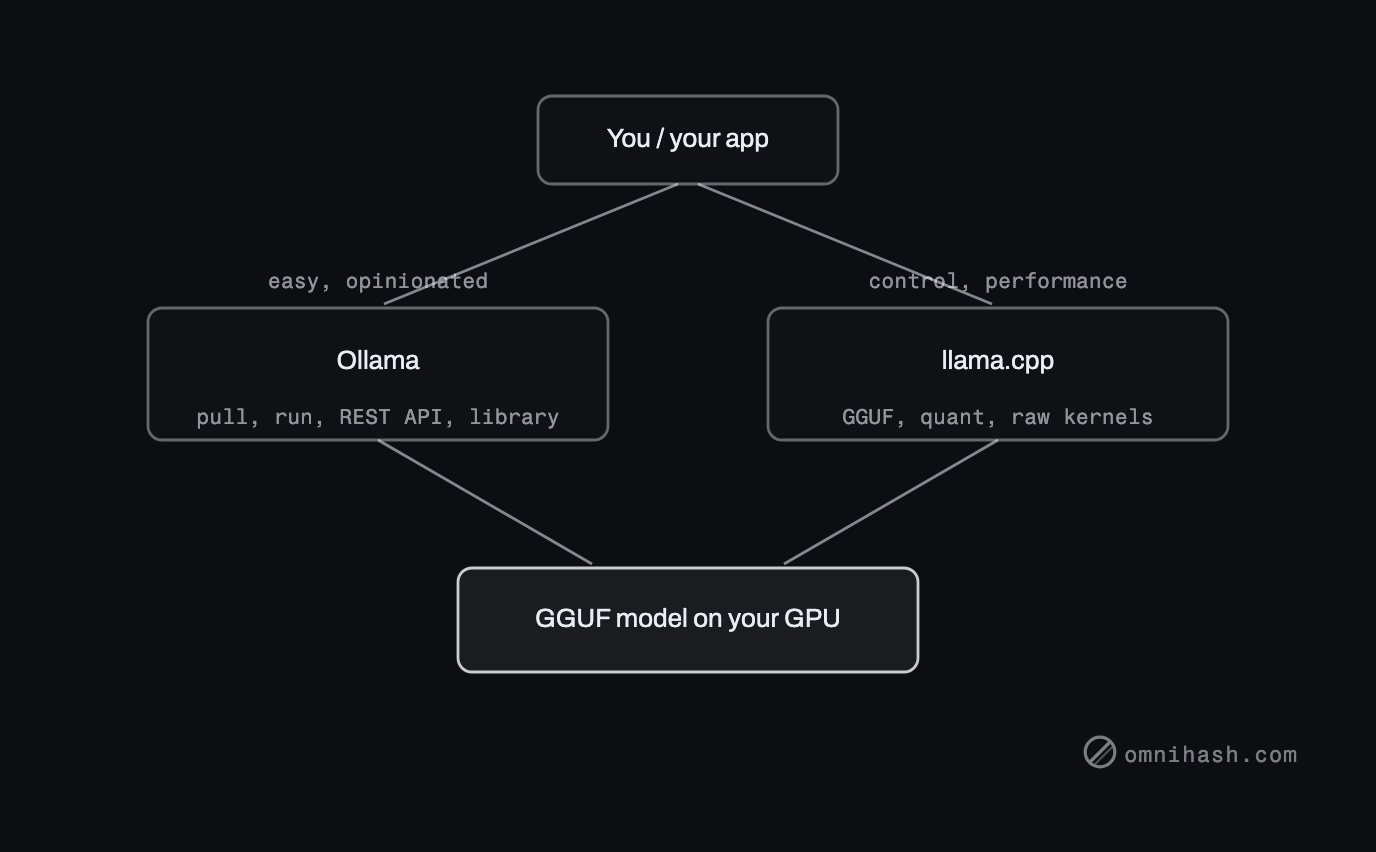 Figure 1. Two paths to one engine. Ollama is the easy, opinionated route (one-line pulls, a model library, a REST API); llama.cpp is the control-and-performance route (GGUF, quantization, raw kernels). Both converge on the same GGUF model running on your GPU.
Ease of use: Ollama wins, decisively
There is no contest on getting started. With Ollama you install it, run the ollama run llama3 command (substitute whatever model you want), and a moment later you are chatting with a model. It detected your GPU, downloaded the weights, picked sane defaults, and started a server. You did not read a single flag.
Doing the same with llama.cpp asks more of you. You either fetch a prebuilt binary or compile one with the right backend enabled for your hardware. You find and download a GGUF file yourself, from the right repository, at the quantization level you want. Then you launch its server with the flags that matter: context length, how many model layers to offload to the GPU, thread count. None of this is hard once you have done it, but it is friction, and on day one it is a wall.
For wiring a model into an application, Ollama also leads out of the gate. It exposes a REST API on a local port the moment it starts, including an OpenAI-compatible endpoint, so a lot of code written for hosted models points at your machine with a one-line base-URL change. Customization is equally gentle: a Modelfile lets you pin a base model, set a system prompt, and fix parameters like temperature into a named, reusable model. It is Dockerfile-shaped and just as approachable.
Control and performance: llama.cpp wins where it counts
Once you need to push, the abstraction that made Ollama pleasant becomes the thing in your way. llama.cpp is where you go to:
- Squeeze throughput. Direct control over GPU layer offload, batch size, threads, context, and KV-cache settings lets you tune for your exact card and workload rather than accepting a sensible default.
- Choose your own quantization. GGUF comes in many quantization levels, and llama.cpp lets you pick or produce the precise trade-off of size, speed, and quality you want, including quantizing a model yourself.
- Embed the engine in your product. This is the big one. llama.cpp is a library, not just a server. You can compile it into your own application and ship inference inside the binary, with no separate daemon to install and manage.
- Reach edge and exotic targets. Because it is portable C++ with multiple backends, it runs in places a heavier convenience layer will not follow comfortably.
- Get new models and features first. Support for brand-new architectures and inference features tends to land in llama.cpp early, then flow outward to the layers built on it. If you need the model that dropped this week, the engine is usually where it works first.
The cost of all that control is that you own all of it. Nobody picked your flags or fetched your weights. That is the deal.
Model management, and the whole of Hugging Face
This is where the daily-use difference is sharpest, and where the case for llama.cpp gets strongest.
Ollama gives you a curated library and a pull command. You ask for a model by name, it fetches a tested build, names it, and tracks it for you. Switching models is one command. The trade-off is that the library is curated, not exhaustive: if a model is not in it (or not yet, or in a variant you want), you are reaching past the convenience layer.
llama.cpp hands you the raw GGUF file and steps back. You decide where weights live, which quantization you keep, and how versions are organized. More importantly, the entire Hugging Face universe of GGUF files is open to you, not a curated shortlist, and when a model does not ship as GGUF you can convert and quantize it from its original Hugging Face weights yourself. That reach is the single best reason to learn the engine: any open model that exists, you can run, including the one that came out yesterday and the obscure fine-tune nobody packaged. Total control, total responsibility, and the bookkeeping is yours.
The comparison, on one screen
| Dimension | Ollama | llama.cpp |
|---|---|---|
| Ease of setup | One install, one run command | Fetch or compile a binary, then configure |
| Control | Opinionated defaults | Every relevant flag is yours |
| Performance ceiling | High (it is the same engine) | Highest, fully tunable |
| Model source | Curated library | Any GGUF on Hugging Face, or convert your own |
| Customization | Modelfiles for prompt and params | Raw flags, custom quantization, source access |
| New model support | Arrives after it lands upstream | Tends to land first |
| API | Built-in REST, OpenAI-compatible | You run its server, or embed the library |
| Best for | Getting started, app prototyping | Production, customization, Hugging Face models, embedding |
The API and integration story
If your goal is to call a local model from an app this afternoon, Ollama is the shorter road. The server is already running, the REST endpoint is documented and stable, and the OpenAI-compatible mode means a lot of existing client code works with a changed base URL. You spend your time on your product, not on inference plumbing.
llama.cpp gives you two integration shapes instead of one. It ships its own HTTP server, so you can stand up an OpenAI-compatible endpoint yourself and point clients at it, much like the above but with you operating the process. Or you skip the network entirely and link the library directly into your application, calling inference in-process. That second option is the one Ollama cannot match, and it is exactly what you want when you are shipping a product with the model inside it rather than running a service beside it.
Which to lean toward
If all you want is a model running this afternoon, Ollama is the fastest on-ramp, and there is no shame in starting there. But for anyone who wants complete customizability and the full run of the Hugging Face model ecosystem, and that is most people doing serious local work, we lean toward llama.cpp.
The reason is reach. llama.cpp runs any GGUF on Hugging Face rather than a curated shortlist, and it will quantize the models that do not ship as GGUF at all. Pair that open model access with full control over quantization and tuning, and the ability to embed the engine directly in your product, and it is the tool that does not run out of room as your needs grow. Ollama's convenience is real, but it is a layer you eventually reach past. llama.cpp is the engine underneath that you never outgrow.
A practical path: prototype on Ollama if it gets you moving, then move to llama.cpp for anything real, where the model selection, the customization, and the performance actually matter. Reach for llama.cpp specifically when:
- You want a model from Hugging Face that no curated library carries, or you want to quantize one yourself.
- You need to wring out throughput or a specific quantization the convenience layer will not expose.
- You need the model that shipped this week, before it reaches the layer above.
- You are embedding inference directly into your own product, or targeting edge hardware.
Choosing Ollama today does not lock out llama.cpp later, but if you already know you will want the control and the open model ecosystem, starting on the engine saves a migration.
One thing neither tool changes: both run on hardware you provide, and the model and quantization you can run are bounded by the GPU and memory in the box. Before you commit to a setup, it is worth knowing what a local AI rig actually costs. If you are weighing a used 3090, an RTX PRO 6000, or a turnkey NVIDIA DGX Spark, that companion article covers the GPU and DGX Spark details, so we will not repeat the numbers here.
At Omnihash we build local and self-hosted AI into real products, which usually means reaching for the engine when performance, customization, or the freedom to run any open model matters. If you are deciding where on that line your project belongs, we are glad to think it through with you.