An engineer on a small team opens a spreadsheet. On one side, a recurring line item: a $200-a-month coding plan, times twelve, times however many people. On the other side, a single used graphics card and a quiet hum in the corner of the office. The question is not abstract. It is "do I buy a GPU and run models myself, or do I keep paying for Claude, Codex, and the APIs." This post is the honest version of that calculation, with real numbers as they stand at the time of writing in late June 2026. Prices move, especially GPU prices, so treat every figure here as a snapshot rather than a constant.
Disclosure: some of the hardware links below are Amazon affiliate links. If you buy through one we may earn a small commission, at no extra cost to you. It does not change the prices or which parts we would actually recommend.
The hardware, and the one number that matters
The temptation is to shop for GPUs the way you shop for gaming cards, by raw speed. For local AI that is the wrong axis. The binding constraint is VRAM: how large a model, at what quantization, with how much context, fits on the card at all. A card that is twenty percent faster but cannot hold your model is not twenty percent better, it is useless for that model. Speed decides how fast tokens come out. VRAM decides whether they come out.
That single fact reorders the whole market. It is why a five-year-old card is still the value king.
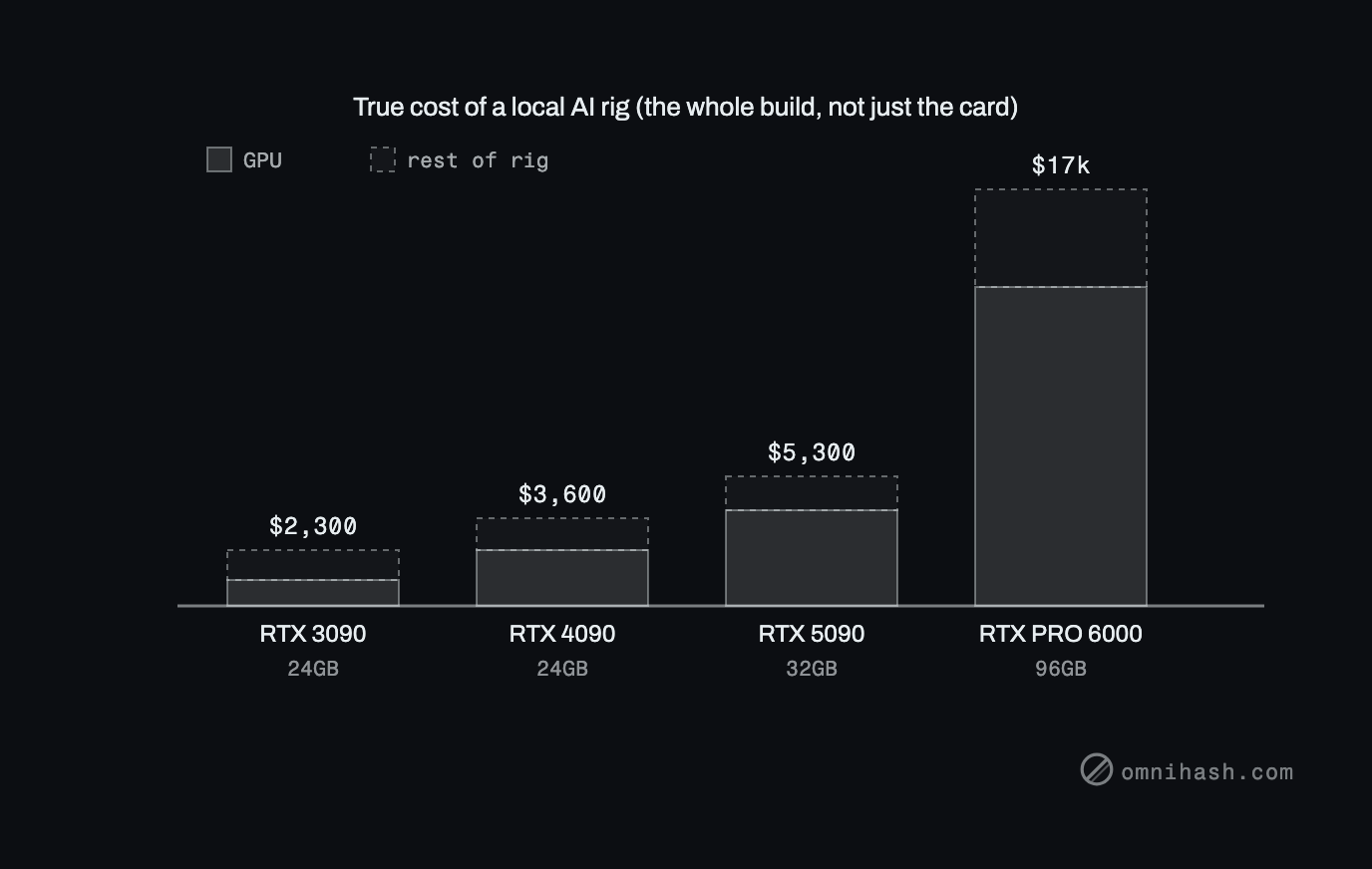 Figure 1. The true cost of a local AI rig once you add the machine around the card: a 3090 build near $2,300, a 4090 build near $3,600, a 5090 build near $5,300, and an RTX PRO 6000 workstation near $17,000. On the cheaper builds the GPU is barely half the total.
| Card | VRAM | Approx price (June 2026) | What it comfortably runs |
|---|---|---|---|
| Used RTX 3090 | 24GB GDDR6X, 936 GB/s | ~$1,000 to $1,200 | 7B to ~32B open weights at good quantization |
| Used RTX 4090 | 24GB | ~$2,300 | Same class as a 3090, faster |
| RTX 5090 | 32GB GDDR7 | ~$3,700 used, ~$4,300 new | Slightly larger models, more headroom |
| AMD Radeon AI Pro R9700 | 32GB | ~$1,300 | Similar tier, but ROCm tooling lags CUDA |
| RTX PRO 6000 Blackwell | 96GB GDDR7 ECC, 1,792 GB/s | ~$12,999 | 70B at high quality, 120B-class MoE, long context |
| NVIDIA DGX Spark | 128GB unified LPDDR5X | ~$3,000 to $4,000 | Turnkey dev box: holds large models, modest speed |
The used RTX 3090 is the card most people should start with. Twenty-four gigabytes of VRAM for around $1,000 to $1,200 is still the best ratio on the market, and in raw speed it sits roughly in RTX 5070 territory, which is plenty. Note the arithmetic that drives a lot of real decisions: two used 3090s cost about the same as a single used 4090, and give you 48GB across two cards instead of 24. For models that shard cleanly, two cheaper cards often beat one expensive one.
The AMD R9700 is genuinely attractive on paper: 32GB, more power efficient, around $1,300. The catch is software. AMD's ROCm stack is still behind NVIDIA's CUDA for AI tooling, and "behind" in practice means more time fighting your environment and fewer projects that just work. If your priority is shipping rather than tinkering, NVIDIA is still the safe pick. That is not a knock on the silicon, it is an honest read of the ecosystem.
At the top sits the RTX PRO 6000 Blackwell, the serious single-card option: 96GB of GDDR7 ECC, 24,064 CUDA cores, 1,792 GB/s of bandwidth, 600 watts. At the time of writing it runs around $12,999, pushed up sharply from a roughly $8,565 launch price by an acute GDDR7 memory shortage. That is real money, but it buys a class of work a 24GB card simply cannot do.
And the broader trend is up, not down. The same memory shortage and AI demand that lifted the RTX PRO 6000 have pushed GPU prices higher across the board over the last two years, which is the opposite of how computer hardware usually ages. A card you buy now is unlikely to be cheaper later.
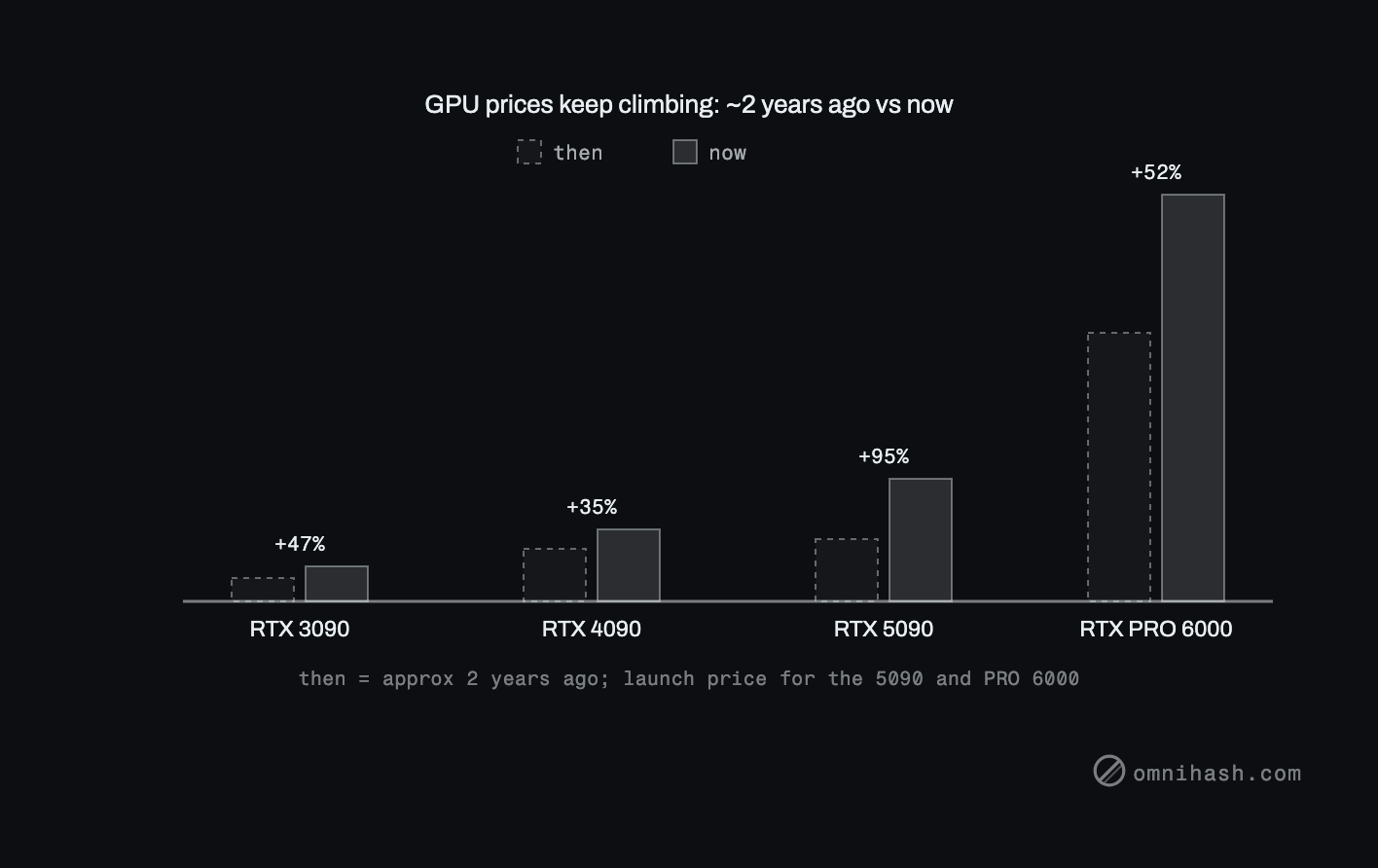 Figure 2. GPU prices have climbed over roughly the last two years, the reverse of the usual slide in used-hardware prices. The two newest cards use their launch price as the baseline.
What each tier can actually run
Frame everything by VRAM and the picture stays durable even as specific model names churn.
- 24GB (a 3090): comfortably runs strong 7B to roughly 32B open-weight models at good quantization. The current families worth knowing are Qwen, Llama, Mistral, Gemma, and OpenAI's own open-weight gpt-oss-20b. A 70B model only fits with heavy quantization or by splitting across two cards. Large mixture-of-experts models like gpt-oss-120b can run with CPU offload, but slowly enough that it is a demo, not a workflow.
- 96GB (an RTX PRO 6000): runs a 70B model at high-quality quantization, a 120B-class MoE, long context windows, several models loaded at once, or real fine-tuning headroom. This is where local stops feeling like a compromise.
- Frontier-scale open weights (DeepSeek-class models at 600B-plus, Llama 4 Maverick-class 400B MoE) do not fit on one card at all. They need a multi-GPU rig or the cloud.
One caveat to keep front of mind, because it is the honest part: local open-weight models are excellent and improving fast, but they still trail the best closed frontier models (Claude, GPT and Codex) on the hardest coding and reasoning tasks. You are trading some capability at the top end for control and cost. Whether that trade is worth it depends entirely on what fraction of your work actually needs the top end.
The rest of the rig
A GPU is not a computer. Whatever card you pick has to live in a host that can feed it, and for a multi-GPU or always-on inference box the host is not an afterthought.
- CPU and PCIe lanes. Running two or more cards, or doing heavy preprocessing alongside inference, wants real PCIe lane count. A workstation platform like the AMD Threadripper PRO 9000WX gives you the lanes and cores a consumer board cannot, which is what keeps multiple cards fed instead of bottlenecked.
- System RAM. Large mixture-of-experts models and CPU offload lean on main memory, so do not starve the box. A healthy bank of DDR5 is cheap insurance, and it is the difference between a 120B model that crawls and one that merely walks.
- The turnkey option. If you would rather not source parts at all, the NVIDIA DGX Spark is a compact desktop AI machine with 128GB of unified memory. It will not match a big discrete GPU on raw throughput, but it holds large models in one place and gets you developing locally out of the box.
A build you could actually order
If you want a concrete starting point rather than a parts-list rabbit hole, here is a balanced starter workstation that runs the 24GB tier comfortably and lands near the $2,300 the cost comparison below is based on. Swap brands to taste; the point is the shape, not the exact SKUs.
| Part | Pick | Approx |
|---|---|---|
| GPU | Used RTX 3090, 24GB | $1,100 |
| CPU | An 8 to 12 core current Ryzen or Core | $300 |
| Motherboard | A board with a full PCIe x16 slot | $200 |
| RAM | 64GB of DDR5 | $200 |
| Storage | 2TB NVMe SSD | $150 |
| Power supply | 850W, 80 Plus Gold | $130 |
| Case and cooling | An airflow case and a decent CPU cooler | $170 |
| Total | ~$2,250 |
That box will run 7B to 32B models all day, and it is the build the cost charts are based on. When you outgrow it the upgrade path is clear: drop in an RTX PRO 6000 Blackwell for 96GB on a single card, or move to a multi-GPU AMD Threadripper PRO 9000WX platform with more DDR5 when you need several cards fed at once. And if you would rather not build at all, the NVIDIA DGX Spark gets you 128GB of unified memory in a box you just plug in.
The cost comparison, which is the whole point
Here is the structural difference that the spreadsheet is really about. A local rig is a one-time capital cost, the card plus the machine around it, plus a little electricity. Claude and Codex subscriptions are recurring, every month, forever. Those two shapes cross at a break-even point, and where they cross depends on which plan you are comparing against.
A full 3090 build, the card plus the rest of the machine around it, lands near $2,300 before it has run a single token. That build breaks even against a $200-a-month plan in about a year, and against a $100-a-month plan in about two. Against a $20-a-month entry plan it effectively never catches up: you would be ahead paying the subscription for the better part of a decade. The entry tier is genuinely hard to beat on pure cost for light use.
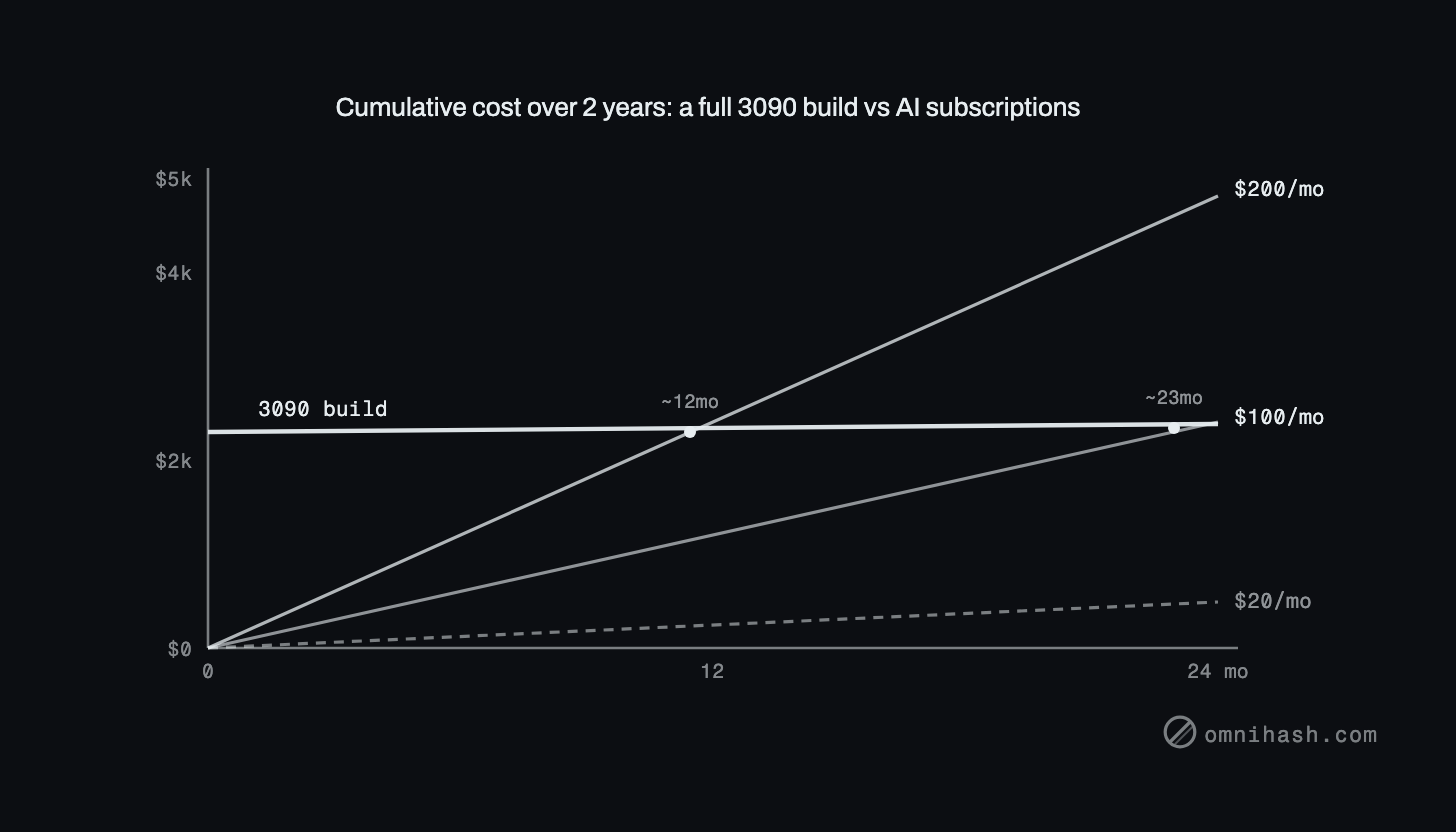 Figure 3. Cumulative cost over two years, counting the whole rig: a one-time 3090 build (around $2,300) as a near-flat line against $20, $100, and $200-a-month plans, with break-even near twelve and twenty-three months.
Electricity is the line everyone forgets, though it is small. A 3090 pulls around 350 watts under load, an RTX PRO 6000 around 600. At typical US power prices that is a few dollars to low tens of dollars per month even under heavy use. Real, but small next to the card. Do not let it swing the decision, just do not pretend it is zero.
Two more options round out the field. Cloud GPU rental lets you touch frontier-scale hardware without capital outlay: at the time of writing an H100 runs roughly $1.40 to $3.00 per GPU-hour depending on provider, and an RTX PRO 6000 ranges from about $1.42 on Vast.ai to around $4.50 on Google Cloud. Frontier subscriptions and APIs sit on the other side: entry coding and chat plans (ChatGPT Plus, Claude Pro, Cursor Pro) around $20 a month, heavy-use tiers (Claude Max, ChatGPT Pro, Codex usage) around $100 to $200, and raw API access billed per token, which can be a few dollars a month for light use or several hundred-plus for heavy agentic coding.
| Dimension | Local hardware | Frontier subscriptions / APIs |
|---|---|---|
| Upfront cost | High: ~$2,300 and up for a full build, once | None |
| Ongoing cost | Just electricity, a few to tens of dollars/month | $20 to $200+/month, or per-token forever |
| Capability ceiling | Strong open weights, trails the very best | The best models on the hardest tasks |
| Privacy | Full: data never leaves your machine | Data goes to a vendor under their terms |
| Ops burden | Yours: drivers, models, heat, noise, uptime | Zero: someone else runs it |
| Best for | Heavy, continuous, parallel, private work | The hard 20 percent, light or bursty use |
How to actually decide
The framing that holds up is not local versus cloud as a war to be won. It is a question of where each one fits.
Local wins for heavy and continuous use, for privacy and on-prem requirements, for fine-tuning, and for batch or embarrassingly-parallel workloads where you would otherwise be metering every token. It also wins on predictable cost at scale: a card you own does not send you a surprise bill when usage spikes. And GPUs hold their value, so the capital is not gone, it is parked. A 3090 you buy today can be resold.
Frontier subscriptions and APIs win for the hardest tasks, for zero operational burden, and for light or bursty use where a card would sit idle. The ops burden is the part people underestimate: running your own models means owning drivers, quantization choices, model updates, thermals, noise, and uptime. That is real work, and for a two-person team it competes directly with shipping.
So the honest answer, most of the time, is both. Run local for the bulk: the routine generation, the batch jobs, the privacy-sensitive work, the high-volume tasks where per-token pricing would bleed you. Reach for Claude or Codex for the hard 20 percent where the frontier still clearly wins. The two compose better than either does alone.
A last piece of practical advice: rent before you buy. Before committing $2,300 or $17,000 to a full build, spend a few dollars an hour on a cloud GPU and run your actual workload on it. You will learn your real VRAM needs and your real throughput in an afternoon, and you will size the purchase to evidence instead of a forum thread.
Privacy and control are not abstractions for us. A lot of the production work we do at Omnihash involves data that genuinely cannot leave a customer's boundary, and for that kind of build, local and on-prem inference is not a cost optimization, it is a requirement. If you are pricing out a setup like this for real work, we are happy to help you size it honestly, including the cases where the right answer is to just pay for the subscription.