A static AWS access key sitting in your CI secrets is a liability that does nothing useful until the day it does something catastrophic. It is a long-lived credential, often with broad permissions, copied into a system that runs untrusted-ish code on every pull request and logs aggressively. One leaked key in a forked workflow, one over-shared secret, one engineer who pasted it somewhere to debug, and an attacker has durable, standing access to your account. The key does not expire on its own. It does not announce that it has leaked. And because rotating it means coordinating every place it is stored, most teams quietly leave it in place for years.
This post is about getting rid of that key entirely, and replacing it with something that cannot leak in the same way.
The real problem with long-lived keys in CI
Three things make a stored AWS access key a poor fit for a pipeline.
- Leak risk. The key is a secret at rest in a third-party system, exposed to every workflow that can read it. Secrets leak through logs, misconfigured workflow triggers, compromised dependencies, and human error. Once out, the key works from anywhere on earth.
- Rotation pain. A static key is only safe if you rotate it regularly, and rotation is exactly the chore nobody does. The credential outlives the engineer who created it and the project that needed it.
- Blast radius. CI keys tend to accumulate permissions, because it is easier to grant one more action than to scope tightly. A leaked broad key is not an incident, it is a breach.
The fix is to stop storing a credential at all, and instead let the pipeline prove its identity at run time and receive credentials that expire in minutes.
What OIDC provides
OpenID Connect (OIDC) is a standard way for one system to vouch for an identity to another. GitHub runs an OIDC provider. For any workflow run, that provider can mint a signed identity token that describes exactly which repository, branch, and environment the run belongs to. AWS, in turn, can be configured to trust that provider and to exchange one of those tokens for temporary credentials.
The result is a pipeline with no AWS secret in it. There is nothing to leak, nothing to rotate, and the credentials that do get issued are short-lived and tightly scoped to the job that asked for them.
The trust handshake, conceptually
The whole mechanism is a single, well-defined exchange. No secret crosses the wire in either direction.
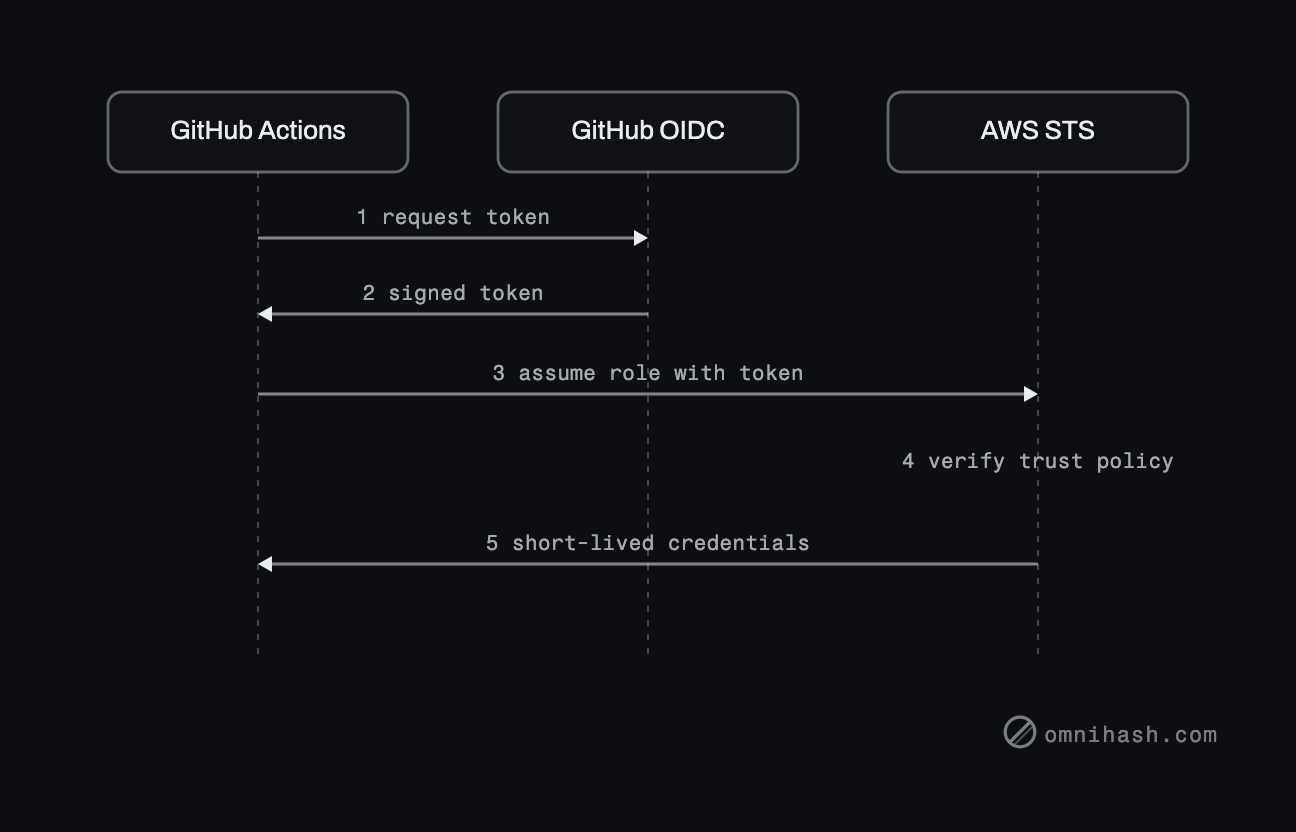 Figure 1. The token-for-credentials handshake. No secret is stored anywhere in the pipeline; the workflow proves who it is, and AWS hands back credentials that expire in minutes.
Walking through it:
- The workflow run asks GitHub's OIDC provider for an identity token.
- GitHub signs and returns a short-lived token. Its claims describe the run: which organization and repository, which branch or tag, and which GitHub Environment, if any. The key claim here is the subject (the sub claim), which encodes that context as a structured string.
- The workflow calls AWS Security Token Service (STS) with the action sts:AssumeRoleWithWebIdentity, presenting the token and naming the IAM role it wants to assume.
- STS verifies the token. First it checks the signature against the IAM OIDC identity provider you configured, which pins GitHub as a trusted issuer and pins the expected audience of the token. Then it checks the role's trust policy, which states which subjects are allowed to assume that role.
- If both checks pass, STS returns temporary credentials that expire after a short window. The workflow uses them for the rest of the job, and then they are gone.
Two AWS-side pieces do the work. The IAM OIDC identity provider answers "do I trust who issued this token, and is the audience correct." The role trust policy answers "is this specific repository and branch allowed to become this role." Both have to agree.
How scoping actually works
Trust is established almost entirely through the token's subject claim. GitHub builds the subject from the run's context, so it reads like a path: the organization and repository, then the kind of reference (a branch, a tag, a pull request, or an environment). The role trust policy matches against this string, and that is where you draw your boundaries.
A well-scoped role restricts to a single repository, and then narrows further to a specific branch or, better, a named GitHub Environment. Pinning to an Environment is the stronger move, because Environments can carry their own protection rules and required reviewers, so the identity and the deployment gate line up. The audience is pinned separately, on the identity provider and in the role's conditions, so a token minted for some other audience cannot be replayed against your role.
Why this is more secure
| Dimension | Long-lived access keys | GitHub to AWS OIDC |
|---|---|---|
| Secret in CI | Yes, stored and readable by workflows | None, nothing to store |
| Credential lifetime | Indefinite until manually revoked | Minutes, per run |
| Rotation | Manual, easily forgotten | Automatic, every run is fresh |
| If it leaks | Durable account access from anywhere | A token that is already expired and audience-bound |
| Scope | Drifts broad over time | Pinned to org, repo, and branch or environment |
| Blast radius | Whatever the key was granted | One role, one repository, one context |
The short version: you replace a permanent secret that an attacker can use forever with a per-run proof of identity that buys credentials lasting minutes and tied to one repository path.
The common pitfalls
OIDC removes the stored-secret problem, but it introduces a configuration problem, and the failure mode is a trust policy that is broader than you think.
- A trust policy that is too broad. The biggest risk is matching more than you mean to. If the policy allows any repository in your organization, then any workflow in any repo can assume the role. Scope to the exact repository.
- Wildcard subject claims. A subject condition that ends in a permissive wildcard, or that matches any reference, effectively pins nothing. Any branch, any pull request from a fork in some setups, can assume the role. Match the full subject you intend, and treat wildcards as a deliberate, audited choice.
- Forgetting to pin the branch or environment. Restricting to the right repository but allowing any branch means a feature branch, or a malicious push, can assume a production role. Pin to your deployment branch or, preferably, to a protected GitHub Environment.
- Mixing up the audience. The audience must match between what the token requests and what the identity provider and role expect. Get it wrong and either nothing works, or, worse, you loosen the audience check to make it work and weaken the guarantee. Set it deliberately and keep it consistent.
- Reusing one role everywhere. A single all-powerful role assumable by several repositories rebuilds the broad-blast-radius problem you were trying to escape. Prefer one role per repository and per environment, each scoped to only the permissions that job needs.
The pattern that holds up: one IAM role per repository and environment, a trust policy that names the exact organization, repository, and branch or environment, a pinned audience, and a permission set scoped to the deployment's actual needs. Short-lived, tightly bound, and impossible to copy out of CI because there is nothing to copy.
Closing
Moving CI from stored keys to OIDC is a small, contained change with an outsized effect on your security posture, and the only hard part is getting the trust policy scoped correctly rather than conveniently. At Omnihash we do this kind of cloud and security work as part of building and hardening products, and we are happy to look at a pipeline and tell you where the boundaries should sit.