Look at three AI features built by three teams in the same company. One drafts replies and needs to read the ticketing system. One summarizes incidents and needs the same ticketing system, plus the database. One is an internal assistant that needs all of it. Each team wrote its own client for the ticketing API. Each team described the same handful of tools to the model in its own slightly different way. Each team wired its own credentials, its own error handling, its own retries. When the ticketing API changed, three teams found out separately, and two of them found out from a user.
This is the tax of hand-wiring tools per app. Every capability is re-implemented and re-described everywhere it is used, and nothing is shared. MCP exists to stop paying that tax.
What MCP actually is
The Model Context Protocol (MCP) is a standard protocol that lets an AI application connect to external tools and data through separate processes called MCP servers. The AI application is the host. The host contains an MCP client, and the client speaks a common protocol to one or more servers. Each server exposes its capabilities in a discoverable, machine-readable way, so the host can ask a server what it offers and get a structured answer rather than relying on a description someone typed by hand.
The point is reuse across a boundary. Because the interface is standardized, one server can serve many hosts, and one host can talk to many servers. The ticketing integration gets written once, behind a server, and every AI app in the company consumes it the same way. Capabilities become things you connect to, not things you re-build.
A server exposes three kinds of things:
- Tools. Actions the model can invoke: create a ticket, run a query, send a message.
- Resources. Data the host can read: a file, a record, a document, a row set.
- Prompts. Reusable prompt templates the server offers, so the server can ship a good way to use its own tools rather than leaving every host to guess.
How this differs from plain tool calling
Plain function calling is not wrong, and MCP does not replace the model's tool-use mechanism underneath. The difference is one of standardization and scope. With classic per-app tool definitions, every application defines, describes, and implements each tool inside itself. The tool exists only in that app. The next app that needs the same capability starts over.
MCP moves the tool out of the app and behind a server with a standard interface. The capability now lives in one place and is discoverable by any host that connects. That single move is what turns N apps times M tools, each wired by hand, into M servers that any of the N apps can use.
| Dimension | Plain tool calling | MCP |
|---|---|---|
| Reuse across apps | None, each app re-implements | One server, many hosts |
| Discovery | Hand-described in each app | Servers advertise tools, resources, prompts |
| Standardization | Per-app, drifts over time | One protocol, consistent interface |
| Operational cost | Low for one app, grows per app | A server to run, but shared |
| Auth model | Inline in the app, ad hoc | Explicit boundary, per-server credentials |
| Best for | One app, a couple of tools | Several tools or several AI apps sharing capabilities |
Read the last row as the whole decision. If you have a single app with two or three tools, MCP is overhead you do not need. Define the tools in the app and move on. MCP earns its keep when capabilities have to be shared: several tools, several AI apps, or both.
The architecture
The shape is a host on one side, servers in the middle, and real systems on the far side.
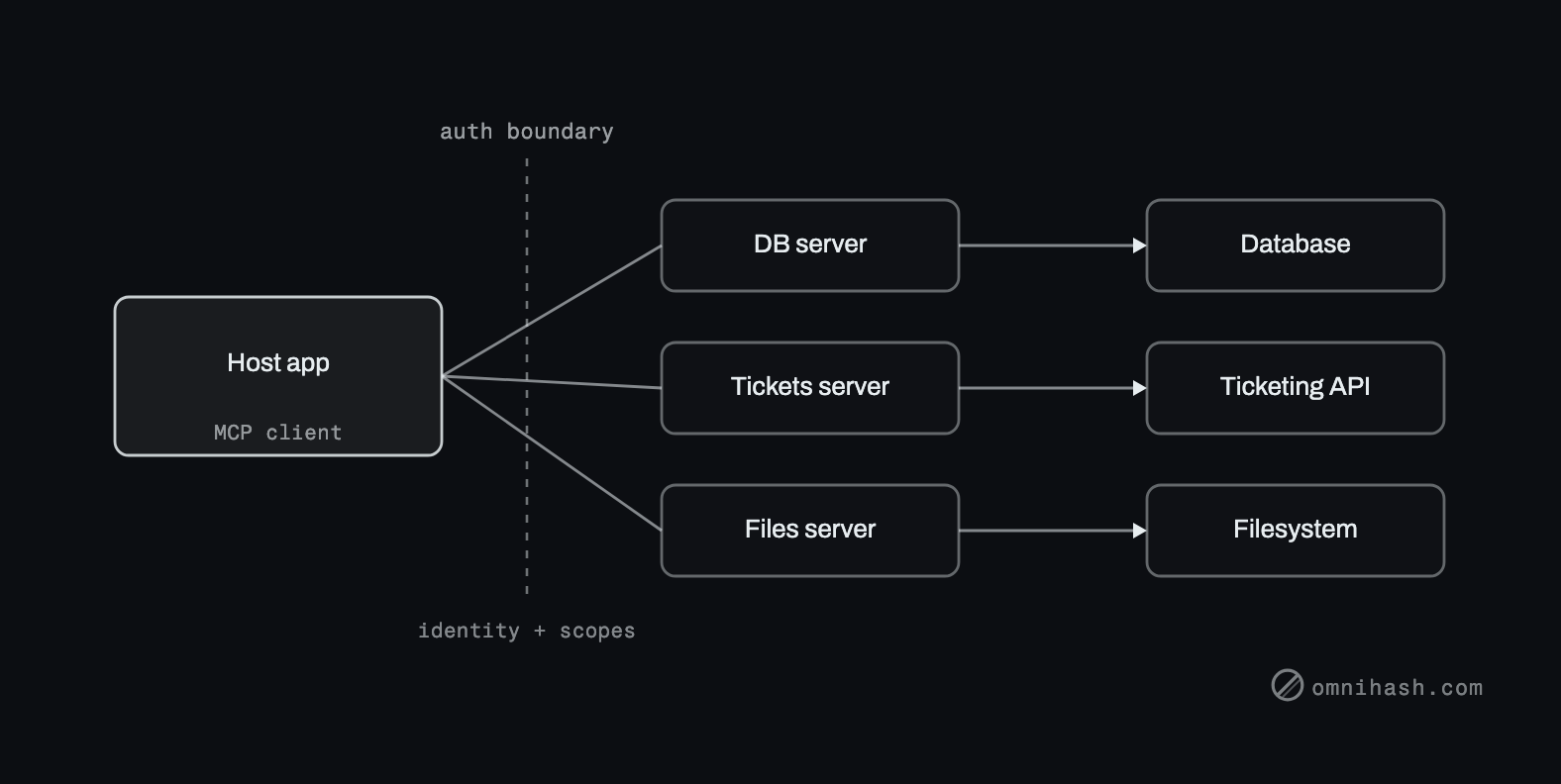 Figure 1. The MCP shape. A host application with an MCP client connects across a trust and auth boundary to one or more MCP servers, each backed by a real system. Identity and scopes flow down the same boundary.
The host owns the model and the conversation. Its MCP client connects to each server, asks what it offers, and presents those capabilities to the model. When the model decides to act, the client calls the server, the server talks to the real system it fronts, and the result comes back. The server is the only thing that knows how to talk to the database, the ticketing API, or the filesystem. The host never touches those directly, which is exactly the property that makes the integration reusable and the security boundary meaningful.
Implementation considerations
MCP is a protocol, but running it is an operational decision, and the decision that matters most is local versus remote.
A local server runs as a process on the same machine as the host, usually communicating over standard input and output. This is simple, has no network exposure, and is the natural fit for a developer tool acting on a local filesystem. A remote server runs as a network service, typically over HTTP, and serves many users and hosts. This is the shape for a shared company capability, and it is also where the security work concentrates, because now you have a network endpoint that fronts a real system.
Three things deserve attention before you ship:
- Transport. Local servers over standard streams are easy. Remote servers over HTTP mean you own a service: availability, rate limits, observability, and the auth that the next section is about.
- Versioning. A shared server is a shared contract. When a tool's behavior changes, every host that depends on it is affected. Version the interface and treat changes the way you would treat any breaking API change, because that is what they are.
- Operational surface. Each server you run is another process to deploy, monitor, patch, and reason about. The benefit is reuse. The cost is that a server fronting a real system is a real piece of infrastructure, not a config file.
Authentication and authorization, where teams get it wrong
This is the part that decides whether MCP is an asset or a liability, and it is the part most often skipped in the demo. The server sits between the model and a real system. Whatever the server can do, the model can ask it to do. So the question is never just "does this work," it is "what is this server allowed to do, on whose behalf, and who approved that."
Start with the trust boundary. The host and the server are separate, and the line between them is exactly where authentication belongs. The host should not assume a server is benign, and a server should not assume every request from a host is authorized. Treat the boundary as adversarial, the same instinct you would bring to any service-to-service call.
A few principles hold up in practice:
- Pass user identity down, do not erase it. When the model acts, it is acting for a specific user with specific permissions. That identity and its scopes need to reach the server, so the server enforces what that user is actually allowed to do. A server that runs every request as an all-powerful service account has thrown away the only thing standing between a confused model and your data.
- Use delegated access for remote servers. For a networked server fronting a system that has its own users, OAuth-style delegated authorization is the right model. The user grants the host limited, scoped access, the host presents a token, and the server acts within that grant. The server never holds the user's raw credentials, and the access can be scoped and revoked.
- Least privilege per server. Give each server only the permissions its job requires. A read-only reporting server gets read-only access. A server that files tickets can file tickets and nothing else. Do not hand a server broad credentials because it is convenient, because broad credentials are exactly what a prompt-injected model will try to use.
- Audit what the model is allowed to invoke. Keep an explicit, reviewable inventory of which tools are exposed, what they can reach, and what scopes back them. Log the invocations. When something goes wrong, the question "what could the model actually do" should have a written answer, not a shrug.
The failure pattern is always the same shape: a server is handed broad standing credentials to make setup easy, user identity gets flattened into a single service account, and now any host that connects, and any successful prompt injection, operates with the union of everything that server can touch. The fix is unglamorous and non-negotiable: identity flows down, scopes are narrow, credentials are per-server, and the whole surface is audited. We make the same argument about CI in setting up OIDC between GitHub Actions and AWS: short-lived, tightly bound, least-privilege beats convenient and broad every time.
MCP does not create new auth problems so much as it makes your existing ones explicit and central. That is a gift. The boundary is now a real place you can reason about, scope, and audit, instead of credentials scattered through application code.
When it is worth it, and when it is not
Reach for MCP when you have several capabilities that more than one AI app should share, or when one host needs to talk to several backing systems through a consistent interface. That is the situation it was built for, and the reuse pays back the operational cost quickly.
Stay with plain tool calling when you have a single app and a couple of tools. Standing up servers, transports, and a delegated-auth story to wire two functions is effort spent on machinery instead of the product. The honest default is to start simple and adopt MCP when sharing, not building, becomes the bottleneck.
At Omnihash, MCP is part of our stack, and a fair amount of the work is drawing the auth boundary correctly so a shared capability does not become a shared liability. If you are weighing MCP for a real product, we are happy to look at the specific capabilities and tell you whether it earns the servers.